
무선 카플레이란 무엇인가요?
BMW는 무선 CarPlay를 지원하는 최초의 자동차 제조업체였으며, 폭스바겐 또한 무선 CarPlay 솔루션을 개발 중이며 유럽에서 해당 기능을 선보였습니다.
메르세데스-벤츠는 2019년형 A클래스에 처음 적용된 MBUX 인포테인먼트 시스템에 무선 CarPlay 지원 기능을 추가했고, 미쓰비시는 2022년형 모델부터 무선 CarPlay를 지원하기 시작했습니다.
포드는 2021년형 F-150과 같이 SYNC 4 인포테인먼트 시스템을 탑재한 일부 2020년형 차량에 무선 CarPlay 기능을 추가하고 있으며, 피아트 크라이슬러의 새로운 Uconnect 5 플랫폼도 무선 CarPlay 연결을 지원합니다. GM 또한 일부 2021년형 차량에 무선 CarPlay를 추가하고 있으며, 현대와 혼다는 2021년형 어코드와 싼타페에 CarPlay를 도입하고 있습니다. 점점 더 많은 자동차 제조업체가 무선 CarPlay를 채택하고 있으며, 앞으로는 유선 버전보다 무선 버전이 더 보편화될 것으로 예상됩니다.
무선 카플레이가 왜 필요한가요?
애플은 iOS 9부터 무선 CarPlay를 지원해 왔습니다. 거의 모든 CarPlay 설정은 연결을 위해 iPhone을 차량 대시보드 시스템에 직접 연결해야 하지만, 무선 CarPlay는 Lightning 케이블이 필요 없도록 iPhone을 차량 시스템에 무선으로 연결할 수 있게 해줍니다.
무선 Apple CarPlay는 차량에서 매우 인기 있는 기능입니다. 만약 여러분의 차량에 무선 CarPlay 지원 시스템이 있거나 최근에 무선 CarPlay 동글을 구입했다면, 이 기능을 활성화하는 방법을 알려드리겠습니다.
iOS 기기에서 무선 CarPlay를 활성화하는 방법
1. 설정 앱을 실행합니다.
2. ‘일반’ 설정을 선택합니다.
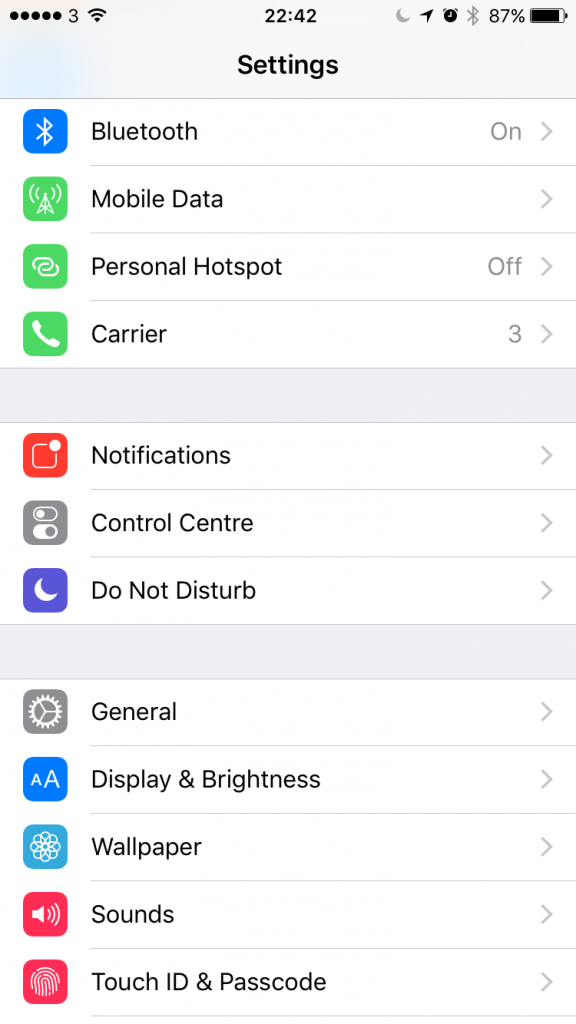
3. ‘CarPlay’ 설정을 선택합니다.

4. CarPlay 설정 화면에서 블루투스가 꺼져 있는 경우, ‘무선 CarPlay 활성화’를 위해 블루투스를 켜라는 메시지가 표시됩니다.

5. 차량용 스테레오의 무선 CarPlay 기능이 활성화된 상태에서 스티어링 휠의 음성 버튼을 길게 누르거나 스테레오 메뉴에서 해당 옵션을 선택하여 기기와 스테레오 시스템 간의 무선 페어링 프로세스를 시작하십시오.
What Wireless Apple CarPlay Systems Are There?
There Are Many Wireless CarPlay Systems Available Now. It Has Taken A Few Years For The Technology To Settle And Become Readily Available, But You Now Have A Few Options Open To You When Looking For Getting Wireless CarPlay In Your Vehicle.
Option 1: Buy A New Vehicle With Wireless Apple CarPlay Option Installed, However It Will Be The Most Expensive Choice.
1.No need to installation
2.don't need to worry about the carplay compatity
it is very costy
Option 2: Upgrade Your Existing Car System With A Newer OEM Receiver That Features Wireless CarPlay. This Usually Involves Buying A Newer System Second-Hand Off EBay And Having It Professionally Fitted And Mapped To Your Older Vehicle.
it might be cheaper than buying a new car or a new aftermarket head unit
you need to have deep knowledge to select suitable carplay
Option 3: Upgrade Your Existing Car System With An Aftermarket Receiver With Wireless CarPlay Support. This Involves Selecting The Right Receiver For Your Vehicle, Then Having It Fitted Either By A Professional Installer (Recommended) Or Fitting It Yourself Using A Number Of Tutorials Online.
A Professional Installer Will Select The Right Components To Install The New CarPlay Receiver In Your Vehicle And Save You The Headache Of Compatibility Of Components Needed, And Reduce The Many Install Issues That Can Arise If You Have Not Properly Configured Or Setup The Receiver Correctly.
1.you don't need to install yourself 2.don't need to worry about the carplay compatity
it might be costy
Option 4: Buy A Wireless CarPlay Dongle For Your Existing Wired Apple CarPlay System.
If You Have A Wired CarPlay System Or Receiver Already Installed In Your Car, You Don’t Have To Replace It Entirely, You Can Just Buy A Simple USB Wireless Dongle And Transform Your CarPlay Head Unit Into A Wireless One.
1. it just needs to plug and play, no need to installation
2.it is the cheapest way to get a wireless carplay
some cars might not be supported by the carplay dongle
Option 5: If You Don’t Have CarPlay Already In Your Car, You Can Buy The All-In-One CarPlay Solution – Wireless Apple CarPlay Dashboard Console 2.0
This Portable Wireless CarPlay Does not Require High-Cost Professional Installation, And Can Fit In Any Cars. If You Do Not Have A Fancy New Stereo With CarPlay Or You Have An Old Car, This Is The Easiest Way To Get Apple CarPlay In Your Car. This Apple CarPlay Dashboard Console Is A Standalone Display That You Fix To Your Car Dashboard Or Windscreen. You Can Connect Your Phone With This CarPlay Console Easily Via Bluetooth Or Wi-Fi.
1. it just need to plug and play, no need to installation
2.it is the cheapest way to get a wireless carplay
havn't seen any negative feedback yet
How to select products at our store?
If your car has a factory CarPlay and want to convert your wired carplay to wireless, You can choose carlinkit new 3.0 U2W Plus
If your vehicle is not compatible with carlinkit 3.0, you can try the MMB Carplay. it is Not only a wireless carplay dongle but it also has its own Android car system, which means You Can Run Any Android 11.0 Compatible App From The Google Play Store On Your CarPlay Display
If your car doesn’t have a display, you could try the Wireless Apple CarPlay Dashboard Console 2.0,This Is The Easiest Way To Get Apple CarPlay In Your Car. This Apple CarPlay Dashboard Console Is A Standalone Display That You Fix To Your Car Dashboard Or Windscreen. You Can Connect Your Phone With This CarPlay Console Easily Via Bluetooth Or Wi-Fi.