
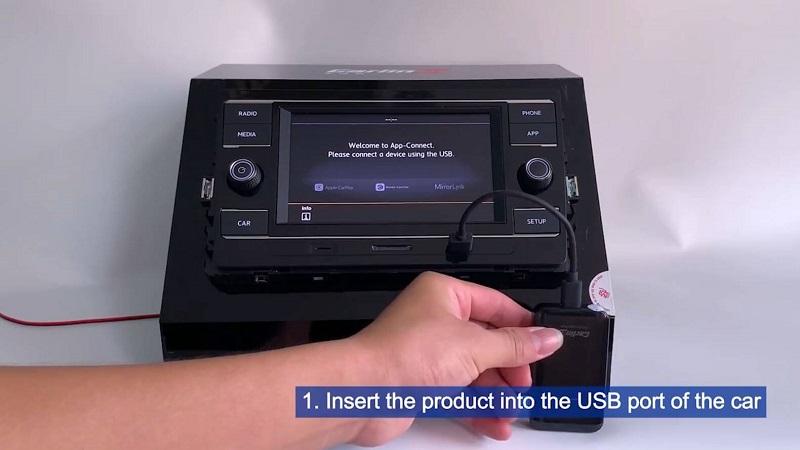
Carlinkit 2.0 동글(U2W Plus)이 있는 경우 무선 CarPlay를 어떻게 연결하고 사용하나요? 유선 CarPlay를 무선으로 전환하는 방법은 단 4단계입니다(자세한 내용은 아래 동영상을 참조하세요).
이 간편한 4단계 튜토리얼을 따라하면 차량의 유선 CarPlay를 무선으로 전환할 수 있습니다. 이제 차에 탈 때마다 데이터 케이블을 꽂았다 뽑았다 할 필요 없이 휴대폰을 연결할 수 있습니다!
제품을 차량의 USB 포트에 꽂습니다. 연결 후 화면이 아래 이미지와 같이 나타납니다. 이제 Apple CarPlay에 연결할 수 있습니다.

아이폰의 Wi-Fi와 블루투스를 켜되, 처음에는 아무것도 연결하지 마세요. 3. 아이폰 또는 차량의 블루투스 인터페이스에서 제품의 블루투스 신호를 검색하세요.one o dell’auto.
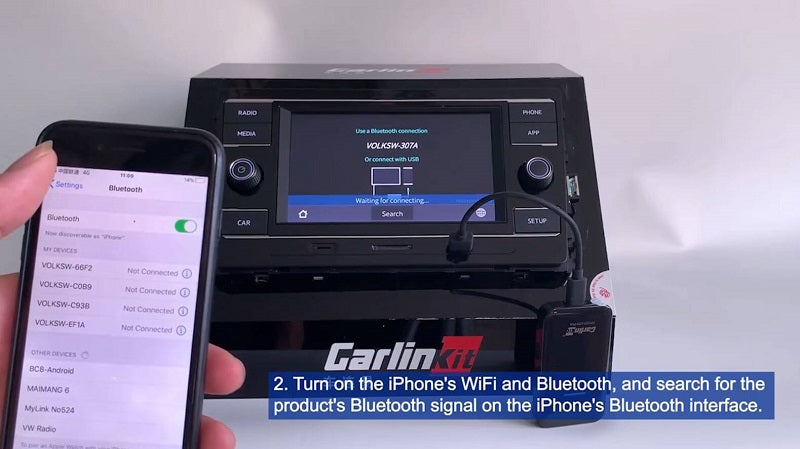

iPhone에서 제품의 블루투스 이름을 클릭하면 페어링 정보가 iPhone에 나타납니다. “CarPlay 사용”을 클릭하세요. 블루투스가 성공적으로 연결되고 Wi-Fi는 자동으로 연결됩니다.

차량에 이 인터페이스를 표시하면 빨간색 표시등이 깜빡입니다. 이는 블루투스가 연결 중임을 의미합니다.
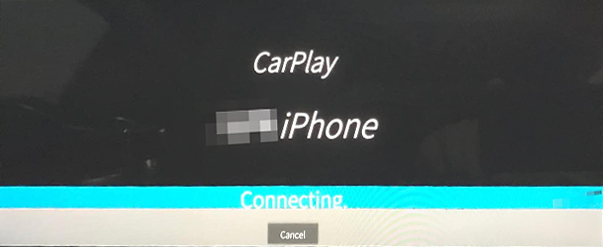
차량에 이 인터페이스를 표시하면 빨간색 표시등이 깜빡입니다. 이는 블루투스가 연결 중임을 의미합니다.la funzione senza fili di CarPlay.

연결 방법에 대한 자세한 내용은 다음과 같습니다.
블루투스 페어링이 필요하며, Wi-Fi는 동글에 연결되어야 합니다.
차량과 iPhone에서 CarPlay 모드를 켜세요. 그러면 Apple 기기에 연결하라는 메시지가 표시됩니다. 동글을 연결하면 화면에 블루투스 신호 이름이 표시되고 표시등은 빨간색으로 켜집니다.
(일부 차량은 다음과 같은 방법으로 CarPlay 모드를 활성화할 수 있습니다. 동글을 분리하고 USB-A-Lightning 케이블을 사용하여 차량에 제공된 유선 CarPlay에 연결한 다음 케이블을 분리하세요. 그러면 화면에 “Apple 기기가 연결되지 않았습니다”라는 메시지가 표시되고 Apple 기기에 연결하라는 메시지가 나타납니다.)
블루투스와 Wi-Fi를 켜되 “연결되지 않음” 상태로 유지하세요. iPhone에서 블루투스 신호를 검색하여 선택하세요. 블루투스 신호 이름이 차량 화면에 표시됩니다.
블루투스 페어링이 성공하면 Wi-Fi가 자동으로 연결되고 블루투스 연결이 해제됩니다. 그런 다음 “CarPlay 사용” 메뉴가 나타납니다. 이 메뉴를 클릭하여 차량에서 CarPlay 인터페이스를 활성화하세요. 연결이 성공하면 표시등이 빨간색에서 녹색으로 바뀝니다.
참고: 차량 디스플레이에서 iPhone의 Bluetooth 이름을 검색하여 페어링 및 연결할 수도 있습니다. “일반” 메뉴에서 “CarPlay”를 찾고 iPhone에서 “CarPlay”가 켜져 있는지 확인하십시오.
